Sample data
A forest plot displays the estimated effect and the confidence interval of several studies or variables in the same chart. It is commonly used in meta-analysis, showing the result of each study and the pooled estimate, and also to display the odds ratios or the hazard ratios of a regression model, such as the Cox models used in survival analysis along with the Kaplan-Meier curves.
In this tutorial we are going to use the following data, which contains the odds ratio of seven studies and their overall estimate, the lower and the upper limits of the confidence intervals and the weight of each study in the meta-analysis. Note that we are converting the studies to a factor with reversed levels, so they will be displayed from top to bottom in the same order.
df <- data.frame(study = c("Study A", "Study B", "Study C", "Study D",
                           "Study E", "Study F", "Study G", "Overall"),
                 OR = c(0.82, 0.64, 1.10, 0.71, 0.93, 0.58, 0.77, 0.76),
                 lower = c(0.61, 0.42, 0.79, 0.55, 0.70, 0.36, 0.60, 0.68),
                 upper = c(1.10, 0.97, 1.53, 0.92, 1.24, 0.93, 0.99, 0.85),
                 weight = c(14, 9, 11, 18, 15, 7, 26, NA))

df$study <- factor(df$study, levels = rev(df$study))
Basic forest plot
In order to create a forest plot in ggplot2 you will need to pass the estimates to x and the studies to y. Then, add the confidence intervals as horizontal error bars with geom_errorbar, passing the limits to xmin and xmax, and the estimates with geom_point.
# install.packages("ggplot2")
library(ggplot2)

ggplot(df, aes(x = OR, y = study)) +
  geom_errorbar(aes(xmin = lower, xmax = upper), width = 0.2) +
  geom_point()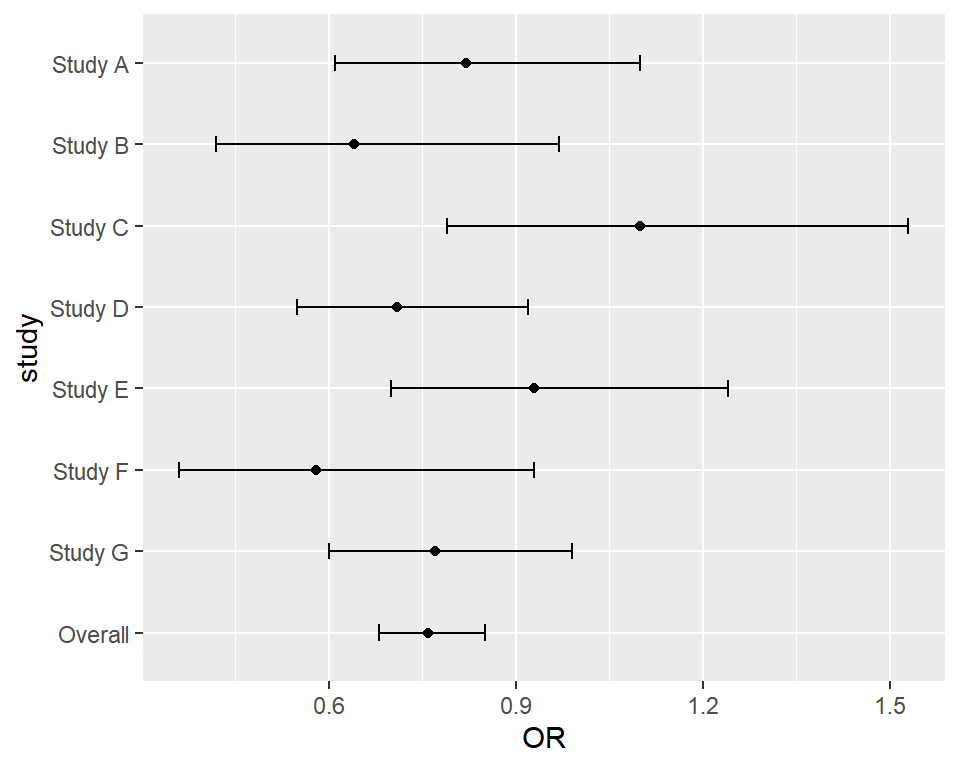
Note that you can also use geom_pointrange, which draws the point and the interval at the same time, but without the vertical lines at the ends.
Line of no effect
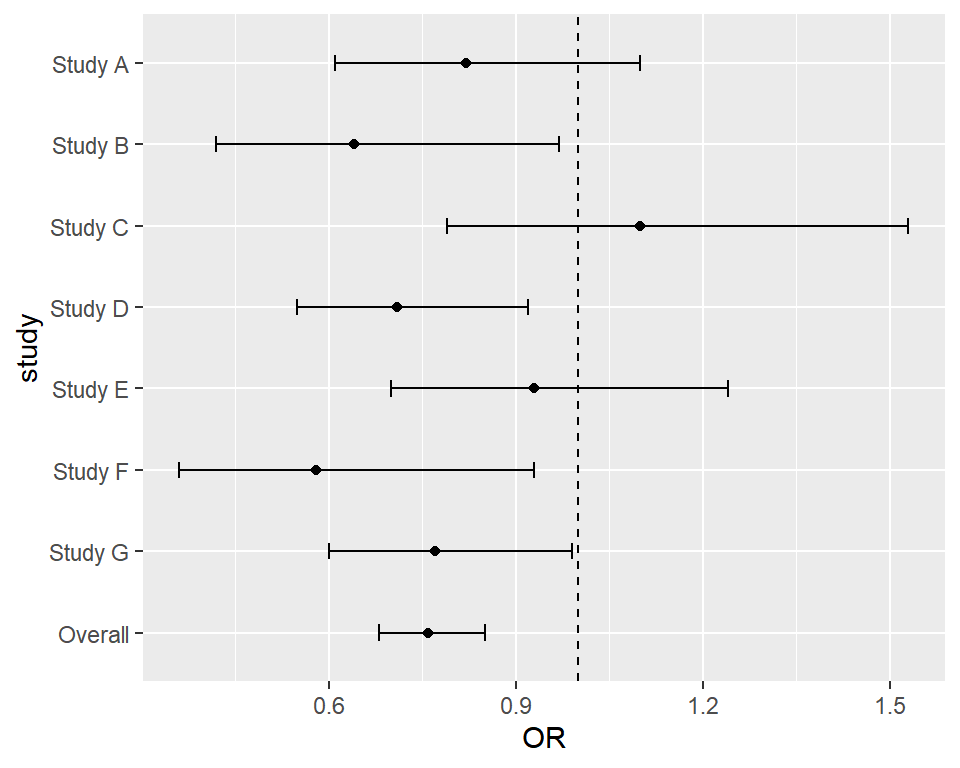
The line of no effect allows identifying which studies are statistically significant, as their confidence intervals don’t cross it. For ratios, such as odds ratios or hazard ratios, the line must be placed at 1, while for differences, such as mean differences, it must be placed at 0. Add it with geom_vline before the other layers, so it is drawn behind them.
ggplot(df, aes(x = OR, y = study)) +
  geom_vline(xintercept = 1, linetype = "dashed") +
  geom_errorbar(aes(xmin = lower, xmax = upper), width = 0.2) +
  geom_point()
Logarithmic scale
Ratios are not symmetric: an odds ratio of 0.5 represents the same effect as an odds ratio of 2, but in the opposite direction. That’s why it is recommended to display ratios on a logarithmic scale with scale_x_log10, so the intervals look symmetric around the estimate. You can also choose the ticks of the axis with breaks.
ggplot(df, aes(x = OR, y = study)) +
  geom_vline(xintercept = 1, linetype = "dashed") +
  geom_errorbar(aes(xmin = lower, xmax = upper), width = 0.2) +
  geom_point() +
  scale_x_log10(breaks = c(0.4, 0.6, 0.8, 1, 1.25, 1.6))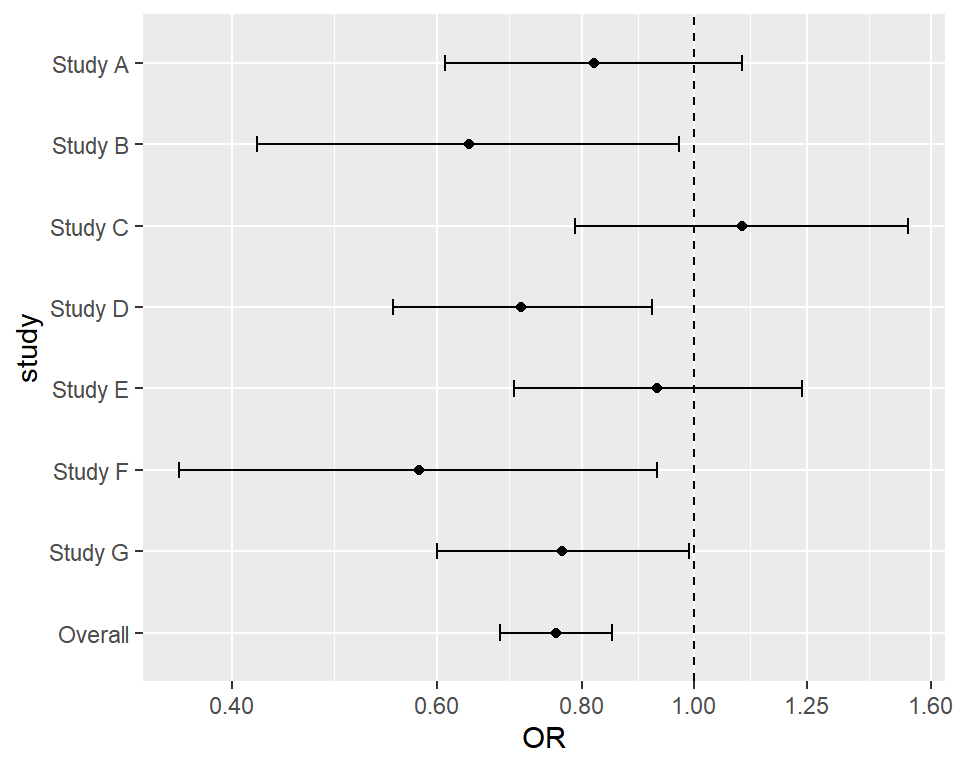
Point size by weight and overall estimate
In a meta-analysis the size of the points usually represents the weight of each study and the overall estimate is displayed with a different shape, typically a diamond. For that purpose, split the data into the studies and the overall estimate, pass the weights to size and add the overall estimate as a new layer with shape = 18. Note that scale_y_discrete keeps the overall estimate at the bottom, as ggplot2 would place it at the end of the scale otherwise. Check the list of shapes in ggplot2 for other options.
studies <- df[df$study != "Overall", ]
overall <- df[df$study == "Overall", ]

ggplot(studies, aes(x = OR, y = study)) +
  geom_vline(xintercept = 1, linetype = "dashed") +
  geom_errorbar(aes(xmin = lower, xmax = upper), width = 0.2) +
  geom_point(aes(size = weight), shape = 15) +
  geom_point(data = overall, shape = 18, size = 7, color = "#E76F51") +
  scale_x_log10(breaks = c(0.4, 0.6, 0.8, 1, 1.25, 1.6)) +
  scale_y_discrete(limits = levels(df$study)) +
  theme(legend.position = "none")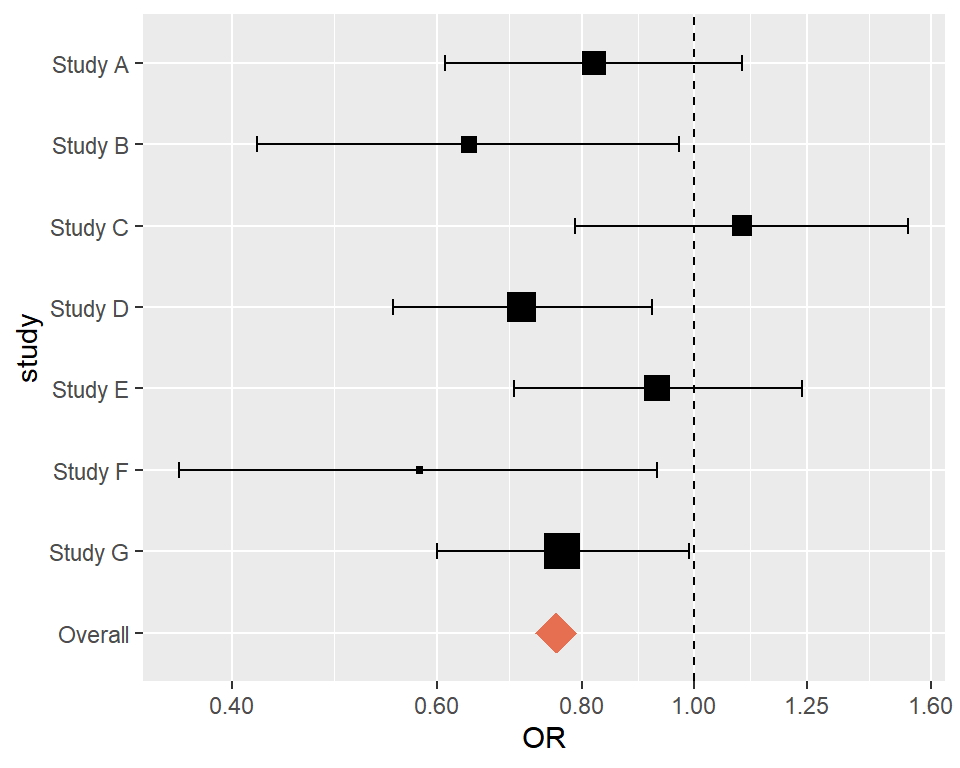
Forest plot with a table of values
It is very common to display the values of the estimates and the confidence intervals next to the plot. You can create a column with the formatted text and add it with geom_text at the right of the plot, increasing the limits of the X-axis and allowing the texts outside the panel with clip = "off".
df$label <- sprintf("%.2f [%.2f, %.2f]", df$OR, df$lower, df$upper)
studies <- df[df$study != "Overall", ]
overall <- df[df$study == "Overall", ]

ggplot(studies, aes(x = OR, y = study)) +
  geom_vline(xintercept = 1, linetype = "dashed") +
  geom_errorbar(aes(xmin = lower, xmax = upper), width = 0.2) +
  geom_point(aes(size = weight), shape = 15, color = "#264653") +
  geom_point(data = overall, shape = 18, size = 7, color = "#E76F51") +
  geom_text(data = df, aes(x = 2.2, label = label), hjust = 0) +
  annotate("text", x = 2.2, y = 8.7, label = "OR [95% CI]", hjust = 0, fontface = "bold") +
  scale_x_log10(breaks = c(0.4, 0.6, 0.8, 1, 1.25, 1.6)) +
  scale_y_discrete(limits = levels(df$study)) +
  coord_cartesian(xlim = c(0.35, 1.7), clip = "off") +
  theme_minimal() +
  theme(legend.position = "none",
        panel.grid.minor = element_blank(),
        plot.margin = margin(10, 120, 10, 10)) +
  labs(x = "Odds ratio (log scale)", y = NULL)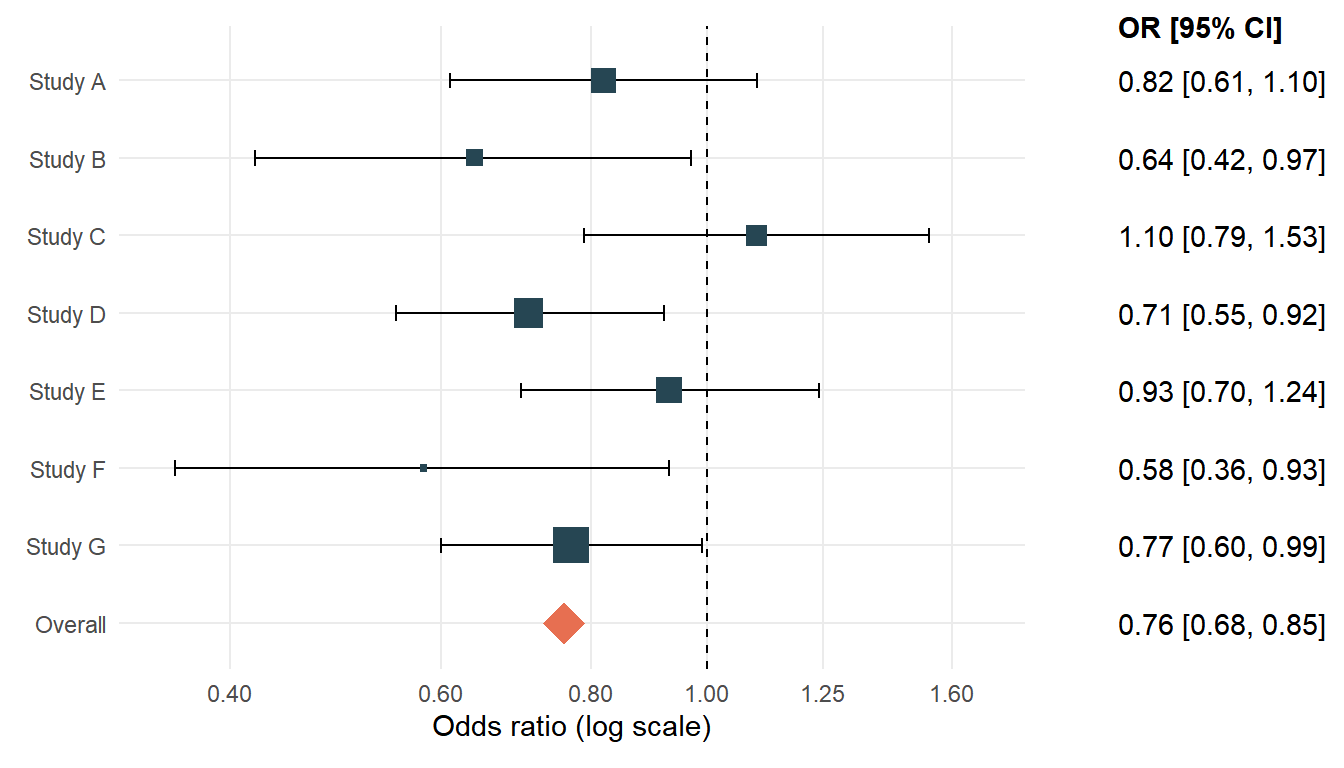
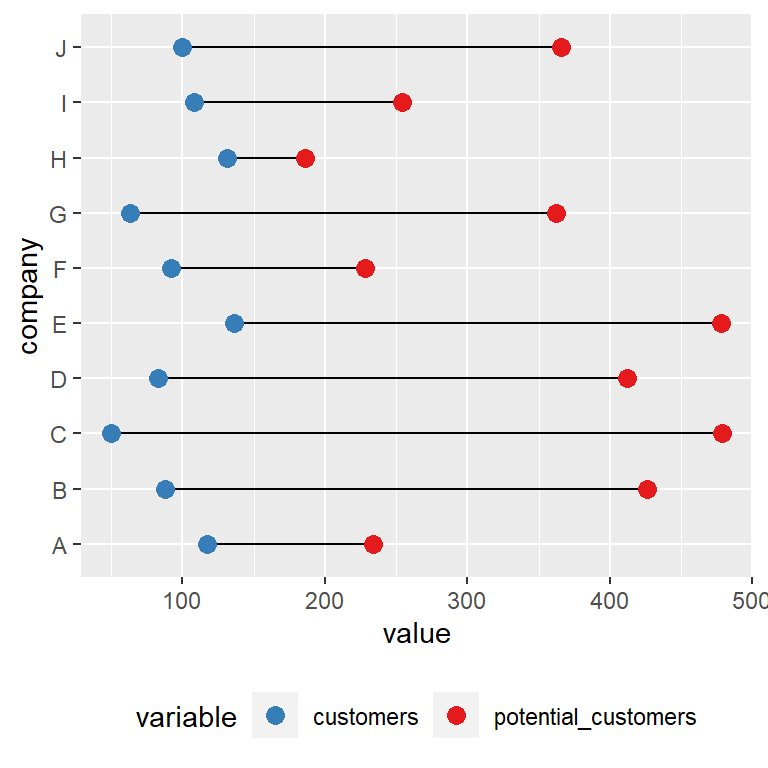
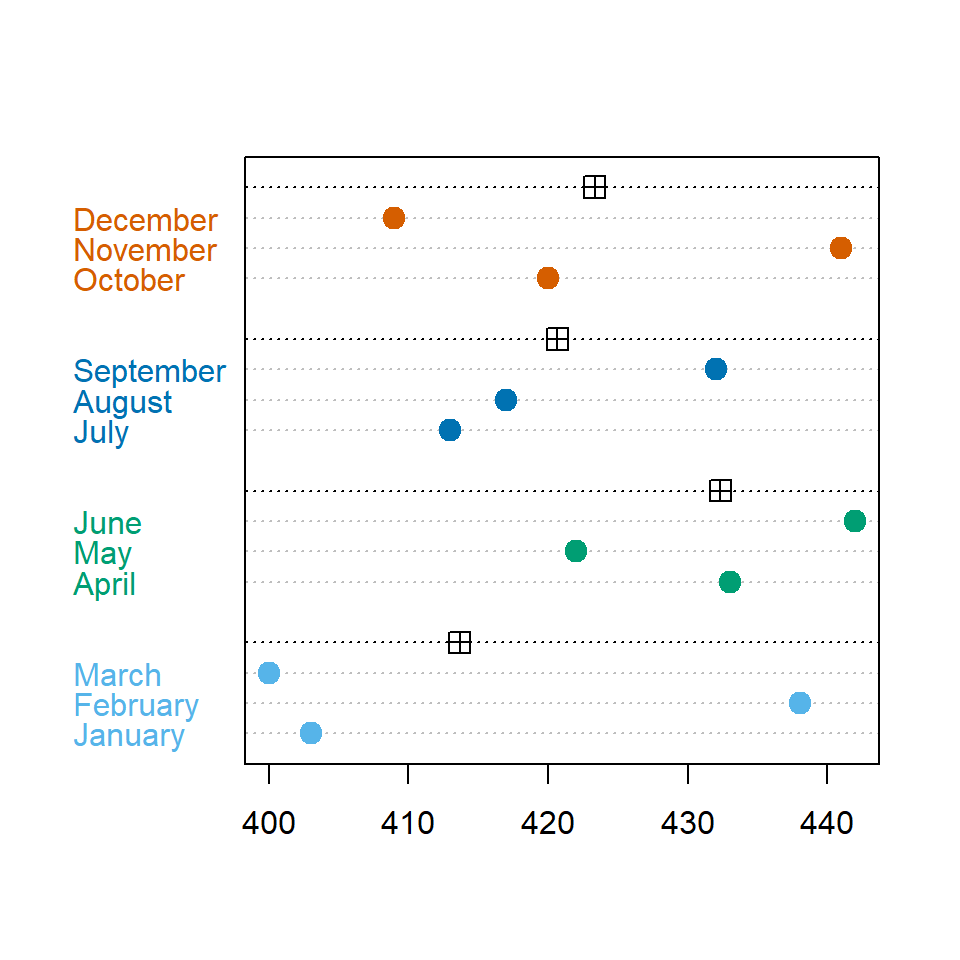
If you prefer a vertical layout you can also display the estimates with the Cleveland dot plot approach or compare two values per group with a dumbbell plot.
Master Statistics
Learn statistics from the basics to advanced techniques, clearly explained
Go to site