Sample data
The Kaplan-Meier curves show the probability of survival over time, so they are the most common chart in survival analysis and clinical trials. The curve drops each time an event (for instance, a death) occurs, creating its characteristic step shape, and it allows comparing the survival of several groups.
In this tutorial we are going to use the lung data set from the survival package, which contains the survival time of patients with advanced lung cancer. The data needs a column with the time (time, in days), a column with the status (status, where 1 means censored and 2 means dead) and, optionally, a grouping variable, such as sex, which we are converting into a factor with descriptive labels.
# install.packages("survival")
library(survival)

df <- lung
df$sex <- factor(df$sex, levels = c(1, 2),
                 labels = c("Male", "Female"))
Kaplan-Meier curve
The easiest way to plot Kaplan-Meier curves with ggplot2 is the ggsurvfit package. First, estimate the survival curve with survfit2, passing a formula with the time and the status inside Surv, and then pass the result to ggsurvfit. Use ~ 1 to estimate a single curve for all the patients.
# install.packages("ggsurvfit")
library(ggsurvfit)

survfit2(Surv(time, status) ~ 1, data = df) |>
  ggsurvfit()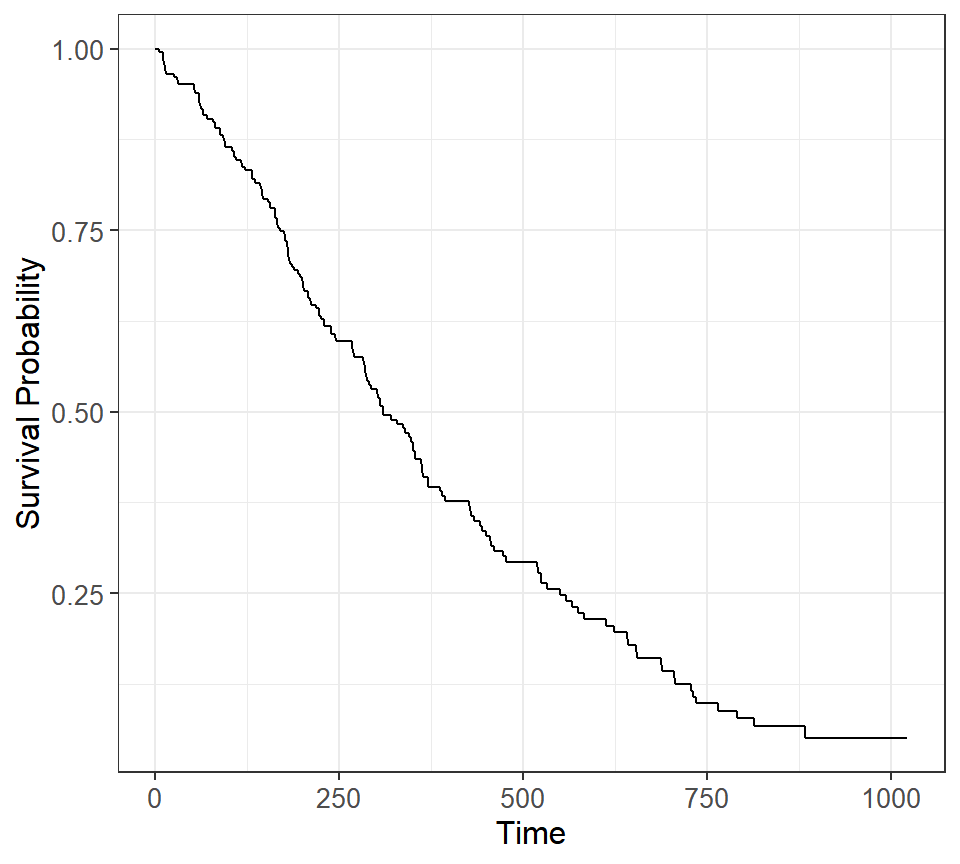
Note that survfit2 works the same way as the survfit function of the survival package, but it stores additional information that ggsurvfit uses to label the plot.
Kaplan-Meier curves by group
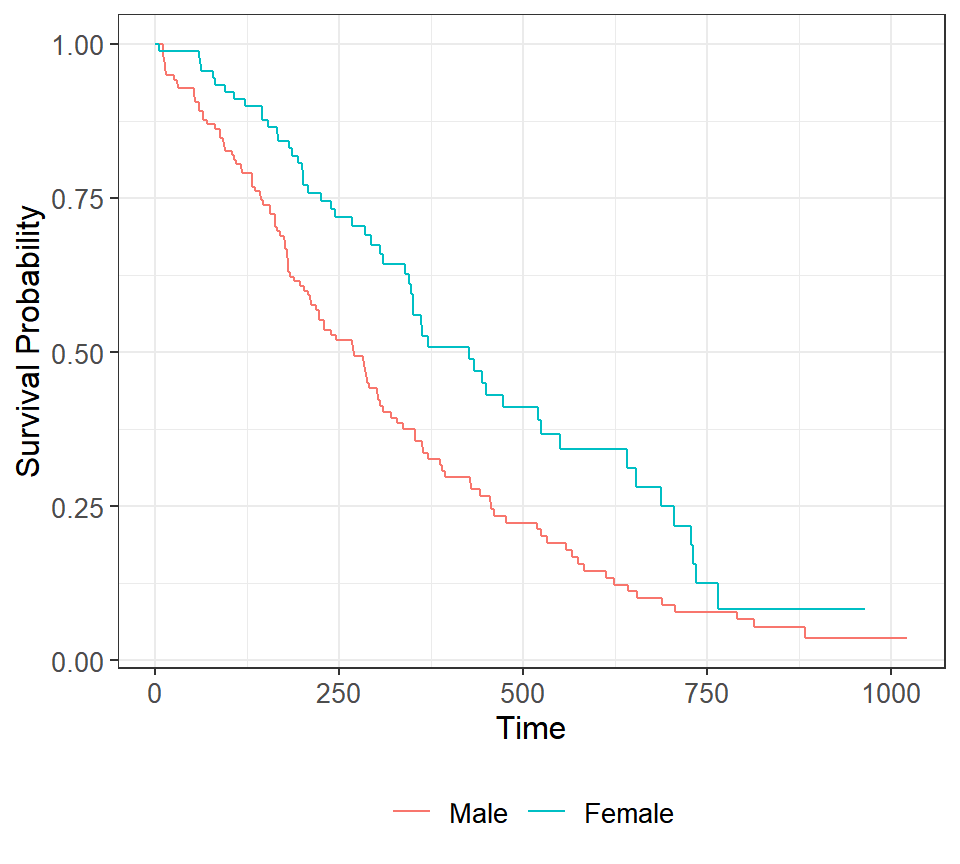
In order to compare the survival of several groups pass the grouping variable to the right side of the formula. A curve will be created for each group, with a different color and a legend.
survfit2(Surv(time, status) ~ sex, data = df) |>
  ggsurvfit()
Confidence intervals and censoring marks
The ggsurvfit package provides functions to add elements to the plot as if they were ggplot2 layers. add_confidence_interval adds the confidence intervals of each curve as a shaded area and add_censor_mark marks the censored observations, this is, the patients that left the study without experiencing the event.
survfit2(Surv(time, status) ~ sex, data = df) |>
  ggsurvfit() +
  add_confidence_interval() +
  add_censor_mark()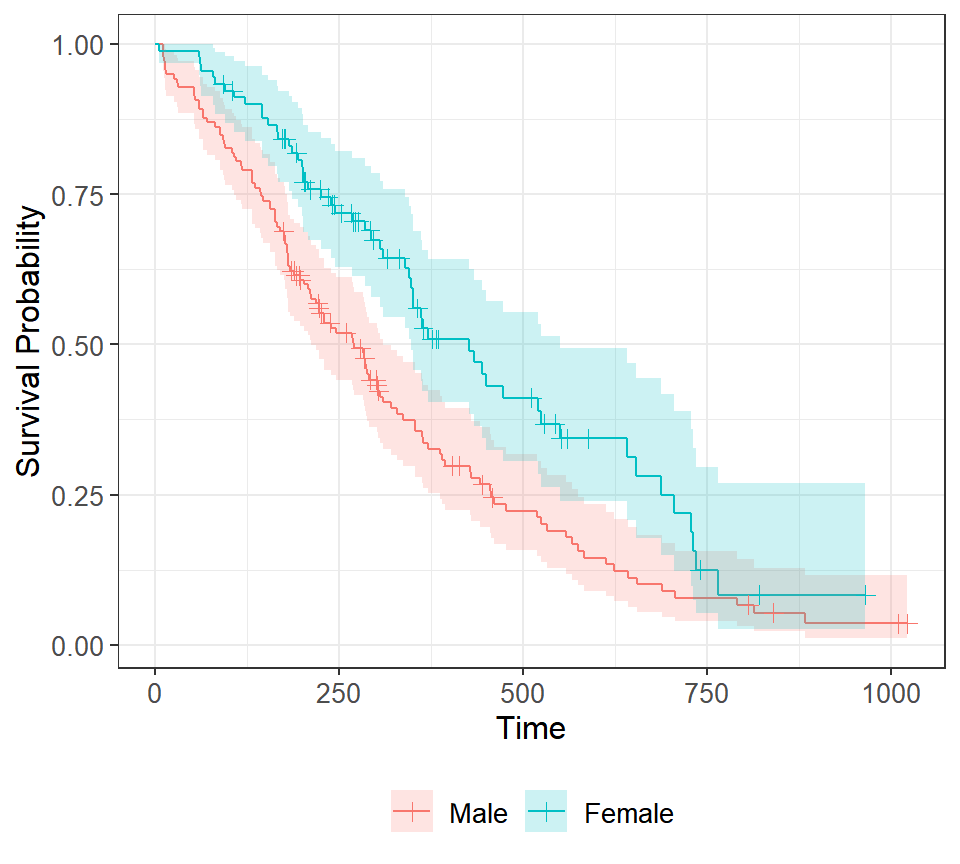
Risk table
The number at risk table, displayed under the plot, shows how many patients are still in the study at each time point. Add it with add_risktable, which also allows choosing the statistics to show with risktable_stats.
survfit2(Surv(time, status) ~ sex, data = df) |>
  ggsurvfit() +
  add_confidence_interval() +
  add_censor_mark() +
  add_risktable()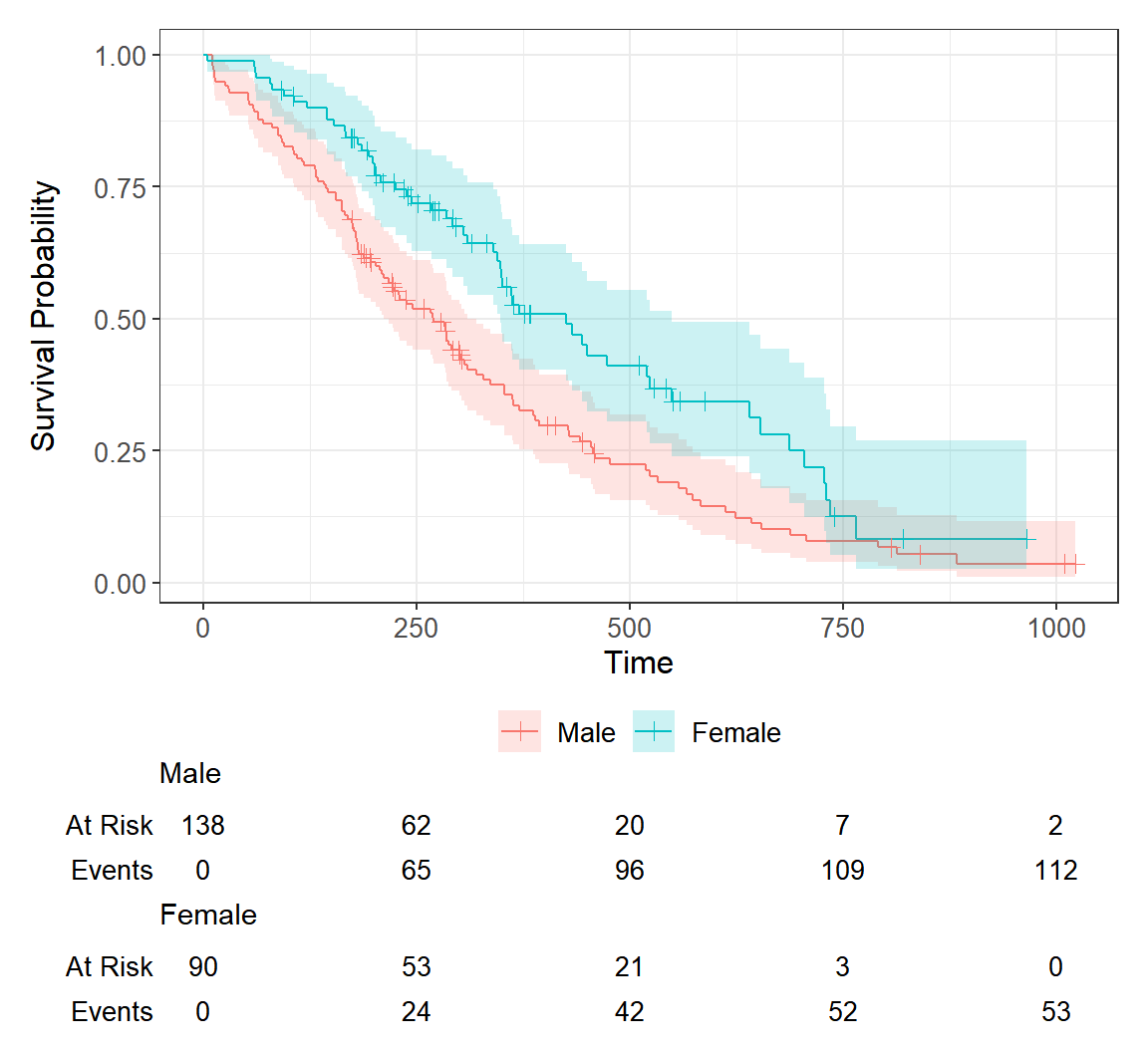
Median survival and p-value
add_quantile draws the lines to the median survival (the time at which the survival probability is 50%) and add_pvalue adds the p-value of the log-rank test, which compares the survival of the groups.
survfit2(Surv(time, status) ~ sex, data = df) |>
  ggsurvfit() +
  add_confidence_interval() +
  add_quantile(y_value = 0.5, linetype = "dotted") +
  add_pvalue(location = "annotation", x = 800)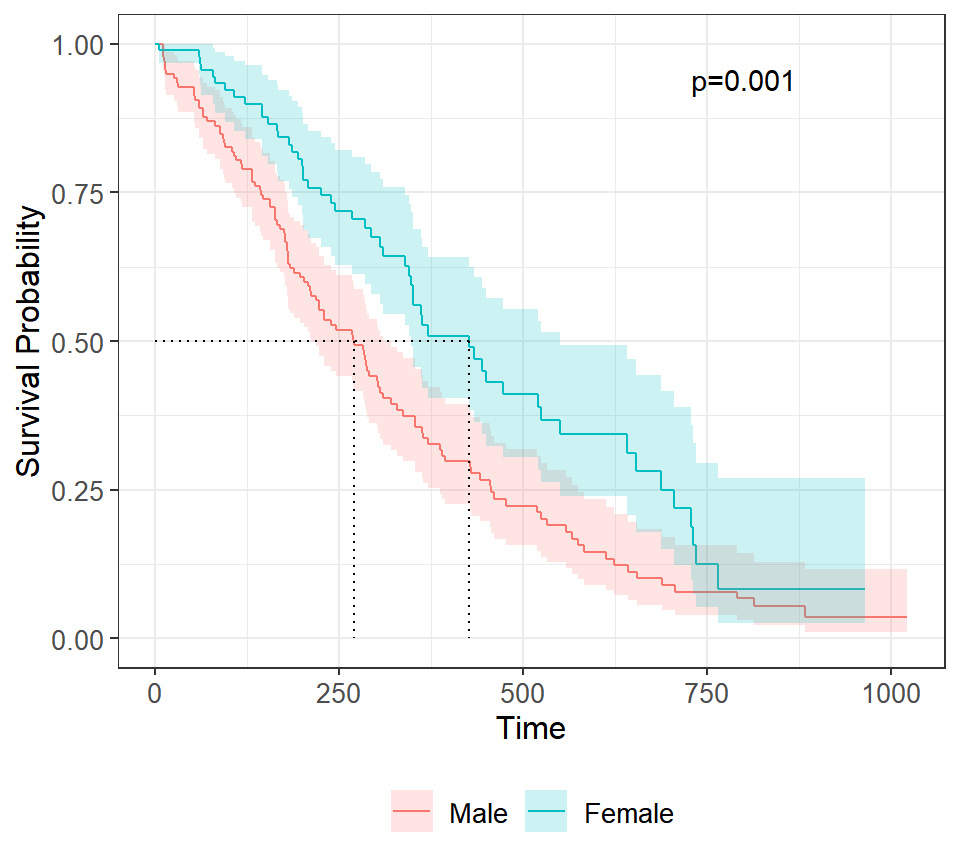
Further customization
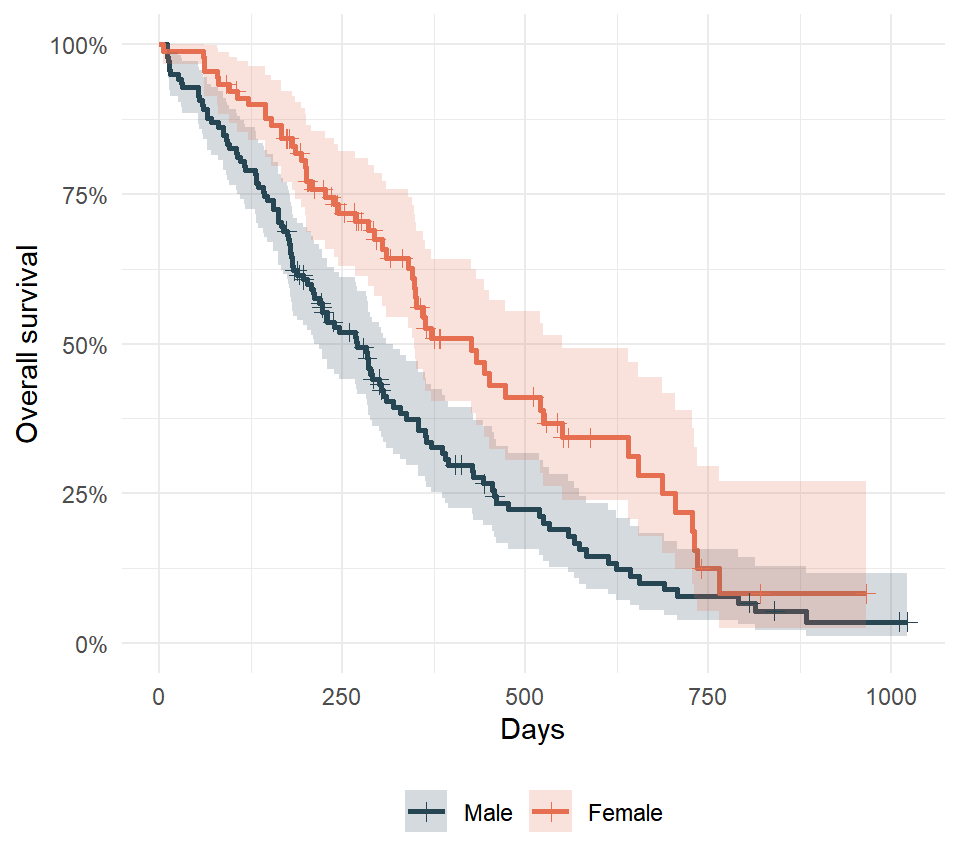
As the output of ggsurvfit is a ggplot2 object you can customize it with the usual functions. Change the colors of the curves with scale_color_manual and the colors of the confidence intervals with scale_fill_manual, show the survival as a percentage with scales::percent and change the theme and the axis titles.
survfit2(Surv(time, status) ~ sex, data = df) |>
  ggsurvfit(linewidth = 1) +
  add_confidence_interval() +
  add_censor_mark() +
  scale_color_manual(values = c("#264653", "#E76F51")) +
  scale_fill_manual(values = c("#264653", "#E76F51")) +
  scale_y_continuous(labels = scales::percent, limits = c(0, 1)) +
  theme_minimal() +
  theme(legend.position = "bottom") +
  labs(x = "Days", y = "Overall survival")
Kaplan-Meier curves in base R
If you prefer base R graphics you can also plot the output of the survfit function of the survival package with the plot function, customizing the line types and the colors of each group. If you need to display the hazard ratios of a Cox regression model you can use a forest plot.
fit <- survfit(Surv(time, status) ~ sex, data = df)

plot(fit, col = c("#264653", "#E76F51"), lwd = 2,
     xlab = "Days", ylab = "Overall survival")
legend("topright", legend = levels(df$sex),
       col = c("#264653", "#E76F51"), lwd = 2)
Master Statistics
Learn statistics from the basics to advanced techniques, clearly explained
Go to site